RFID silicone wristbands vs PVC wristbands is a practical buying question. Both materials can carry RFID or NFC chips. Both can support access control, cashless payment, locker management, membership identification, and guest verification. The better choice depends on wear time, reuse, transfer control, comfort, and the environment where the band will be used.
For hotels, gyms, water parks, festivals, hospitals, and resorts, the wristband is the part of the RFID system that guests touch all day. A reader and software platform handle the data, but the wristband decides whether people keep the credential on, whether staff can identify it quickly, and whether the item feels aligned with the venue.
Quick Recommendation
| Buying Question | Choose RFID Silicone Wristbands | Choose PVC RFID Wristbands |
|---|---|---|
| Use duration | Repeat use, resort stays, gym access, membership, staff credentials | Single event, short visit, patient ID, visitor pass, temporary access |
| Transfer control | Works when reuse is managed by account binding, collection, or staff rules | Better when a one-time buckle is required to prevent sharing |
| Comfort | Soft, washable, and comfortable for longer wear | Lightweight and practical for short or medium-term wear |
| Brand feel | More premium for clubs, resorts, spas, and loyalty programs | Clear event credential with strong visual sorting by color or print |
What RFID Silicone Wristbands Do Well
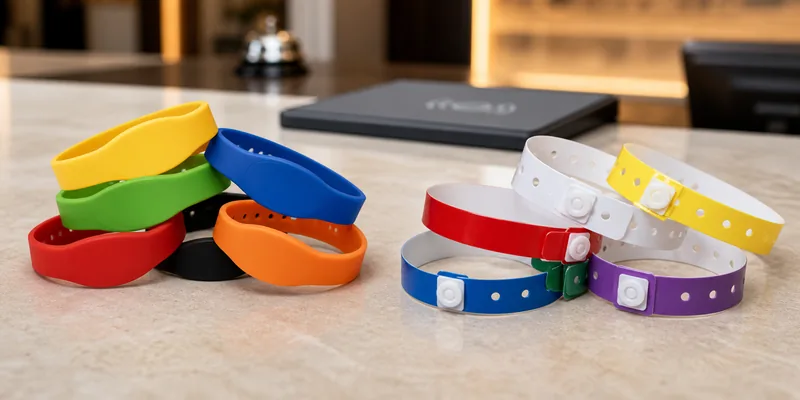
RFID silicone wristbands are usually selected when the same credential may be worn many times or for several days. Silicone feels soft on the wrist and performs well in wet, sweaty, or outdoor environments. ASIARFID describes its silicone wristbands as waterproof, moisture-proof, shockproof, washable, and durable, with common uses in pools, hotels, amusement parks, hospitals, exhibitions, and carnivals.
The main reason to choose silicone is reusable value. A hotel can issue a silicone wristband as a room key, payment credential, and pool access pass during a guest stay. A gym can assign one to a member for repeated entry. A resort can match band color and logo to its visual identity. In these cases, the wristband is part of the experience rather than a disposable ticket.
Silicone also gives buyers strong branding options. Color, logo placement, printed or debossed artwork, size, and chip options can be specified before production. The limitation is transfer control. A reusable silicone band can be passed to another person unless the project includes account binding, collection rules, or a closure design that discourages casual sharing.
What PVC RFID Wristbands Do Well
PVC RFID wristbands fit projects where the buyer wants a durable disposable credential. ASIARFID describes PVC wristbands as multilayer, tensile-resistant, comfortable, and more suitable than paper wristbands for longer or harsher use. The one-time buckle is the key advantage because it helps prevent transfer and improves on-site security.
That makes PVC a strong option for festivals, hospitals, amusement parks, temporary access zones, exhibitions, and visitor management. A guest wears the band, uses it for entry or payment, and staff can cut it off when access ends. The operator does not need to collect, clean, store, and reissue the credential after use.
PVC also gives staff simple visual control at scale. Bands can be made in different colors for age groups, ticket levels, days, departments, or access zones. Logos, QR codes, serial numbers, and color rules help staff make quick decisions before an RFID reader is used. The tradeoff is repeat purchasing and more waste when the same users return often.
The Key Buying Differences
1. Wear Time and Reuse
Start with the real wearing cycle. If a wristband will be used by the same person again and again, silicone is usually the stronger candidate. If each user needs one credential for a limited time, PVC usually fits better. This question often narrows the choice before chip selection begins.
2. Security and Transfer Prevention
For ticketed events, hospital visitors, temporary staff, and restricted zones, the credential should be difficult to pass to another person. PVC wristbands with one-time buckles are designed for that control. Silicone can still be secure, but the buyer should define how reuse, collection, and account assignment will work.
3. Water, Sweat, and Outdoor Exposure
Both materials are used in wet environments. Silicone is often preferred for swimming pools, spas, gyms, water parks, and resort stays because it is soft, washable, and comfortable for extended wear. PVC is also useful where rain, sweat, or splash exposure would make paper wristbands unreliable.
4. Comfort and Guest Experience
A wristband that irritates guests creates support problems. Silicone normally wins for comfort over repeated use. PVC is practical for shorter cycles, especially when the band must remain attached until staff remove it. For children, hospitals, or VIP areas, request samples and check edge feel, buckle comfort, and wrist size before mass production.
5. Branding and Visual Management
Silicone can feel more premium and permanent. PVC is excellent for operational sorting because color, print, numbering, and one-time use are easy to manage. A resort membership program may favor silicone. A festival with multiple ticket types and daily access changes may favor PVC.
6. Chip, Frequency, and Encoding
The wristband material does not replace system planning. RFID wristbands may use LF, HF/NFC, or UHF chips depending on the reader, software, distance, and data requirements. RFID wristbands for access, payment, and identification should be matched to the installed reader system before production. Buyers should confirm chip model, memory needs, UID or encoded data rules, and sample performance with their own terminals.
What to Prepare Before Ordering
Before requesting a quotation, prepare the use case, expected wear duration, environment, quantity, artwork, size range, chip type, reader model, encoding format, and whether the wristband must be disposable or reusable. If your team is unsure about chip frequency, send reader details and software requirements first. It is easier to adjust material, chip, and artwork before molds, printing, or encoding files are confirmed.
For custom projects, custom RFID wristbands can be planned across silicone, PVC, fabric, paper, wooden, and other materials. One site may use silicone for members, PVC for day guests, and fabric for a special event. The right mix can reduce waste, improve guest comfort, and keep access rules clear for staff.
Why Work With ASIARFID
ASIARFID supplies RFID wristbands, RFID cards, NFC tags, RFID labels, and custom RFID products for B2B projects. For wristband orders, the practical value is material selection, chip matching, artwork support, and production control in one process. Buyers can compare silicone and PVC samples, confirm the RFID chip, and align printing, encoding, and packaging before bulk production.
If your project includes access control, cashless payment, lockers, event ticketing, hotel management, or patient identification, share the reader model and site workflow with ASIARFID. That information helps match the wristband to the system instead of treating material choice as a guess.
FAQ
Are RFID silicone wristbands better than PVC RFID wristbands?
They are better for reusable and comfort-focused projects. PVC is often better for disposable, tamper-evident, short-term access.
Can both silicone and PVC wristbands be waterproof?
Yes. Both materials are commonly used where water, sweat, or outdoor exposure is expected. Buyers should still test samples with their own readers and site conditions.
Which material is better for hotels?
Silicone is usually a strong choice for hotel guests, resort members, pools, gyms, and spa areas. PVC can work for day visitors, temporary passes, or short-term event access.
Which material is better for festivals and events?
PVC is often preferred when transfer prevention, color-coded admission, and disposable issue are important. Silicone can be used for VIP or reusable passes.
Can ASIARFID customize RFID wristbands with logo and chip options?
Yes. ASIARFID can support custom wristband material, color, logo, chip selection, size, and related production requirements. Share your reader system and use case before bulk ordering.
Contact ASIARFID to compare RFID silicone wristbands and PVC RFID wristbands for your access, payment, hotel, healthcare, or event project.